
Super Memory
Super Memory is an independently developed Breezell memory system. It uses two built-in Breezell models to extract useful information from conversations. The exact model names are not disclosed.
Memory extraction is handled by Breezell's internal model pipeline and does not consume tokens from the model configured by the user or reduce the user's model token quota.
What Super Memory can extract
Super Memory can organize extracted information into several types:
- Memory: Stable facts, preferences, standing instructions, and decisions that may be useful later.
- Skill: Reusable methods or workflows discovered during a task.
- Experience: Outcomes, lessons, and practical knowledge from previous work.
- Trajectory: The progression of a task, decision, or goal over time.
- Resource: Useful files, links, tools, or reference material associated with the work.
The system extracts and classifies these items automatically from conversations so they can be recalled as relevant context in later interactions.
Browse and filter memories
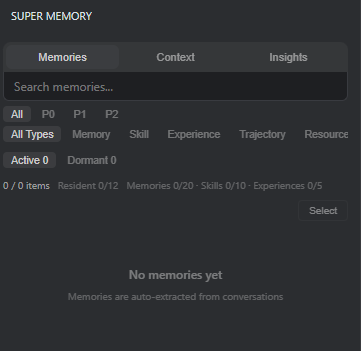
The panel provides the following views and controls:
- Memories, Context, and Insights: Switch between extracted memory entries, assembled context, and higher-level memory insights.
- Search: Find stored entries using text.
- Priority: Filter by P0, P1, or P2, or show all priorities.
- Type: Filter by Memory, Skill, Experience, Trajectory, or Resource.
- State: Separate Active entries from Dormant entries.
- Capacity counters: Review the total item count and the current capacity used by resident entries, memories, skills, and experiences.
- Select: Enter selection mode to choose specific entries for management.
When no entries exist, the panel shows that memories will be extracted automatically from conversations. As conversations continue, useful items can appear here without requiring the user to write them manually.
Key advantages
Super Memory combines automatic extraction with efficient and highly controllable retrieval:
- Powerful extraction: Two internal Breezell models analyze conversations and convert useful information into structured Memory, Skill, Experience, Trajectory, and Resource entries without requiring manual entry.
- Efficient retrieval: Type, priority, state, freshness, and the compiled memory index help narrow recall to information relevant to the current task instead of treating every stored item equally.
- Controllable context injection: The Context view exposes the current-turn injection snapshot, the next-turn memory index preview, and its estimated token size.
- Explicit lifecycle control: P0 permanent, P1 30-day, and P2 7-day priorities work with Active and Dormant states so important knowledge can remain available while temporary information naturally receives a shorter lifecycle.
- Observable knowledge health: Compilation status, source and compiler versions, stale resources, failures, verification, correction, freshness, and unsynced counts make the memory system inspectable.
- Token awareness: Extraction does not consume the user's configured model tokens. Recalled memory that is injected into a request becomes part of that request's context; the preview and savings statistics help make this usage visible.
Context and retrieval control
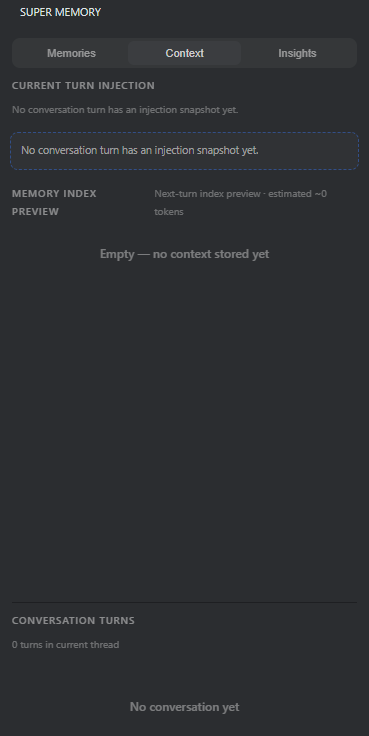
The Context view shows how memory participates in conversations:
- Current Turn Injection: Displays the memory snapshot injected into the current conversation turn. Before a snapshot exists, the panel clearly shows an empty state.
- Memory Index Preview: Previews the index prepared for the next turn and estimates its token size, making retrieval volume easier to review.
- Conversation Turns: Shows the number of turns in the current thread and provides a place to inspect turn-level memory activity.
These controls make retrieval observable and manageable: users can see whether memory was injected, what is being prepared next, and the approximate context cost.
Insights and system health
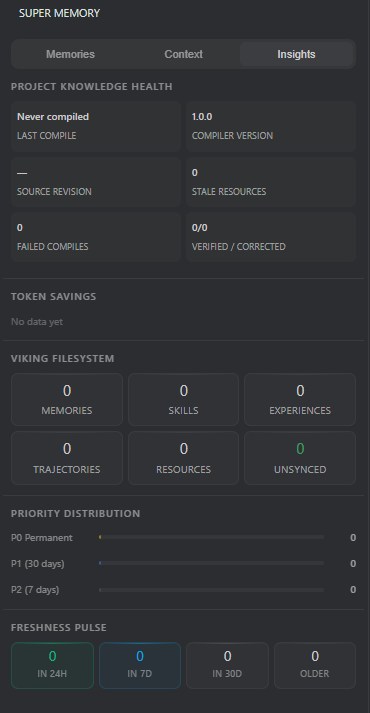
The Insights view summarizes the state and effectiveness of the memory system:
- Project Knowledge Health: Shows the last compilation, compiler and source versions, stale resources, failed compilations, and verified or corrected totals.
- Token Savings: Reports token savings when enough activity has been recorded.
- Viking Filesystem: Displays counts for Memories, Skills, Experiences, Trajectories, Resources, and Unsynced items.
- Priority Distribution: Shows the balance of P0 permanent, P1 30-day, and P2 7-day entries.
- Freshness Pulse: Groups knowledge updated within 24 hours, 7 days, 30 days, or an older period.
Together, Context and Insights provide a transparent view of what Super Memory extracts, what it may retrieve, and how healthy and current the stored knowledge remains.
Active and dormant memories
Active memories remain available for relevant recall. Dormant memories are retained but separated from the active set, helping keep current context focused while preserving information that may still be useful later.
Demonstration: turning a repair into reusable memory
This example uses an intentionally broken HTML Task Manager to demonstrate how Super Memory changes a short repair session into reusable knowledge.
The repair request asks the AI to inspect the entire codebase and fix task creation, deletion, completion, filtering, counters, localStorage persistence, keyboard input, and clearing completed tasks without changing the intended interface or behavior.
1. Inspect and repair the Task Manager
Breezell inspects the code, identifies the shared root causes, repairs the implementation, and verifies the complete workflow rather than treating each visible symptom as an independent bug.
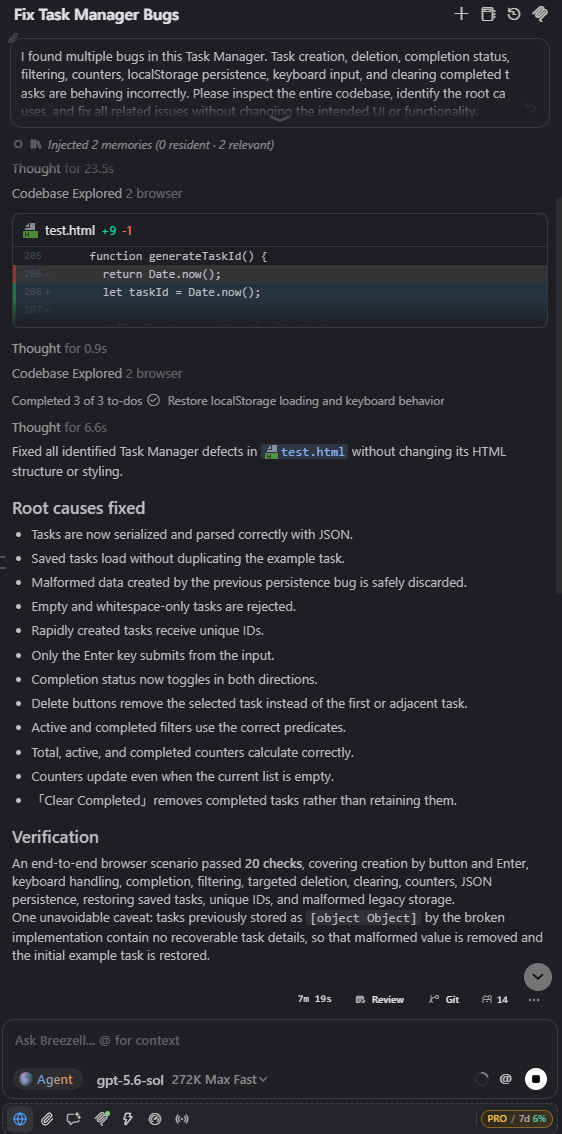
The repair covers serialization and parsing, duplicate loading, malformed saved data, empty-task validation, stable task identities, keyboard handling, completion toggling, targeted deletion, filters, counters, and clearing completed tasks.
2. Initial P2 resource records
Because this is a small test and the first result mainly describes concrete file edits, Super Memory initially records two edited sections of test.html as P2 Resource entries.
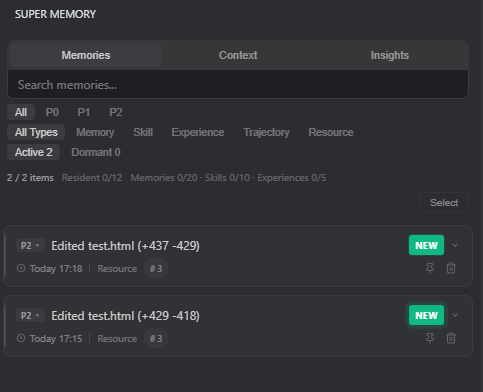
These entries preserve what changed and where it changed. P2 gives this short-lived implementation detail a lower priority without discarding the repair trace, making it available if the AI later needs to recall which file regions were modified.
3. Prompt deeper reflection
For this compact demonstration, the user asks:
What lessons did you learn from solving this issue?
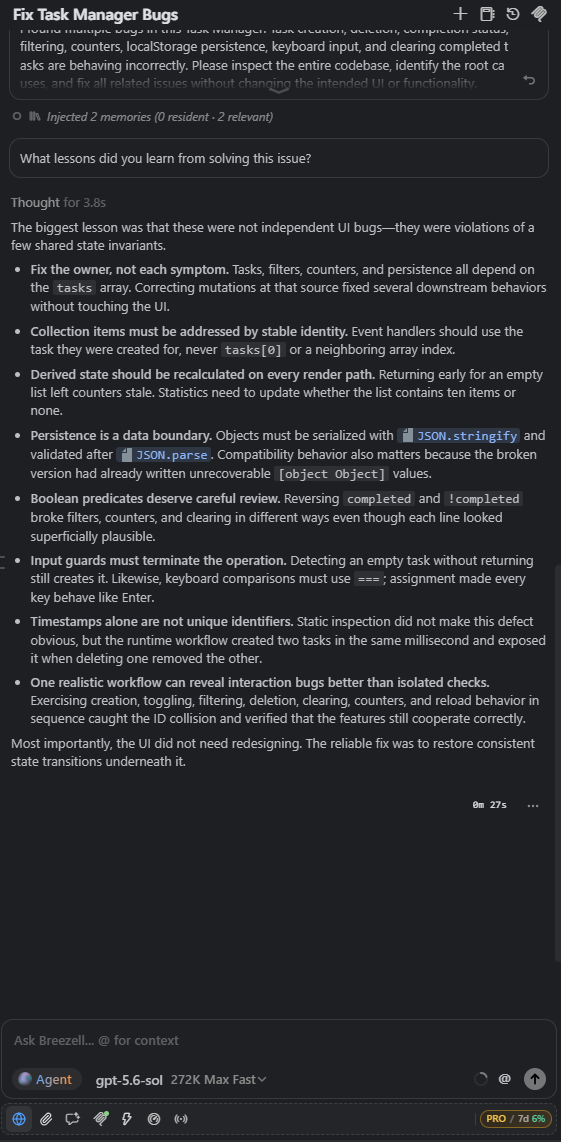
The answer identifies reusable engineering lessons: repair the owner of shared state rather than every symptom, address collection items by stable identity, recompute derived state on every render path, treat persistence as a validated data boundary, review Boolean predicates carefully, terminate invalid input paths, avoid timestamp-only identities, and verify features through a realistic end-to-end workflow.
4. Extract structured repair knowledge
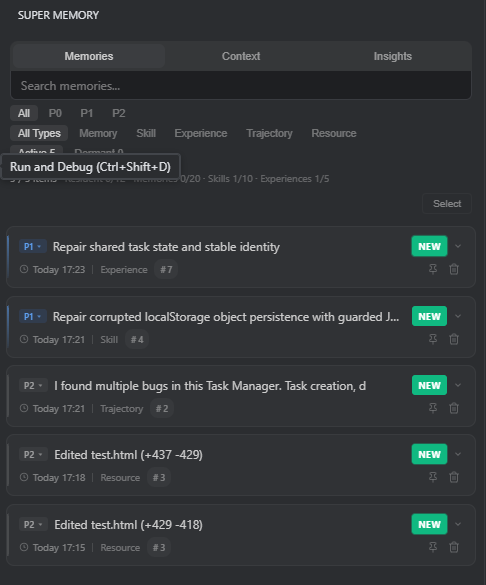
After the repair is examined at a deeper level, Super Memory adds higher-value structured entries:
- A P1 Experience about repairing shared task state and stable identity.
- A P1 Skill for repairing corrupted localStorage persistence with guarded serialization and parsing.
- A P2 Trajectory that summarizes the multi-bug Task Manager problem and its resolution path.
- The original P2 Resource records that preserve the edited file locations.
What this demonstrates
- Extraction depth adapts to value: Small edits may begin as P2 resources, while reusable root-cause knowledge can be promoted into P1 skills and experiences.
- Different memory types have different jobs: Resource and Trajectory preserve what happened; Skill and Experience preserve how and why the problem was solved.
- Priority remains controllable: P1 retains the more reusable repair knowledge longer, while P2 keeps short-term implementation details available without giving them permanent weight.
- Memory becomes useful to future AI work: Later tasks can retrieve the relevant file history, repair method, or engineering lesson instead of relying only on the original conversation transcript.
- Manual reflection is not normally required: The follow-up question is used here to make a very small test produce an obvious result. For longer-running or high-value bugs, Super Memory can automatically identify and record durable repair experience without requiring the user to ask this question.
Deep dive: why the Memory category is empty
Filtering this example by Memory shows 0 items, even though Super Memory successfully extracted useful knowledge.
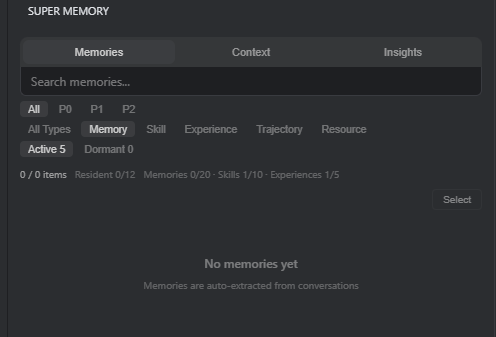
This is intentional classification, not an extraction failure. The repair did not produce a durable personal preference, stable user fact, or standing instruction that belonged in general Memory. Instead of duplicating everything as generic memory, Super Memory placed each result in the type that best describes its future use: Skill, Experience, Trajectory, and Resource.
Skill: a reusable localStorage recovery pattern
The P1 Skill entry turns one specific repair into a reusable procedure for client-side state persistence.
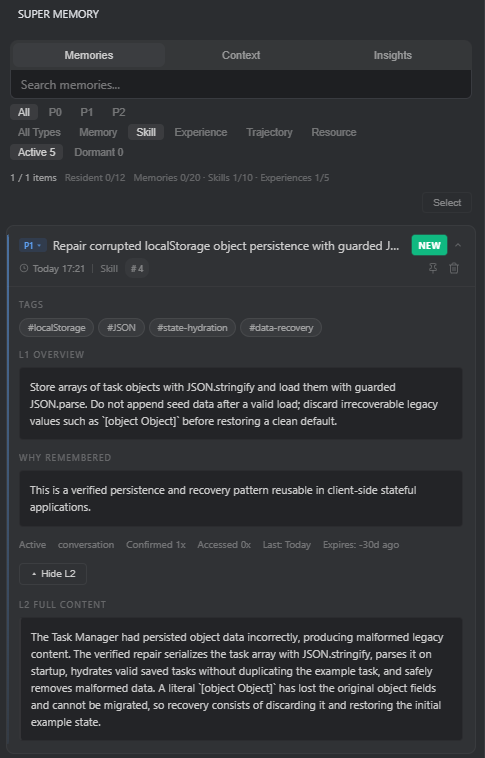
The card shows:
- Tags: localStorage, JSON, state hydration, and data recovery make the skill easier to retrieve for related problems.
- L1 Overview: Store task arrays with JSON.stringify, load them using guarded JSON.parse, avoid adding seed data after a valid load, and discard unrecoverable legacy values such as object-to-string corruption before restoring a clean default.
- Why Remembered: The system identifies this as a verified persistence and recovery pattern reusable in stateful client applications.
- L2 Full Content: Preserves the detailed failure mode and the complete recovery procedure for deeper retrieval when needed.
- Metadata: The card exposes its P1 priority, type, activity state, confirmation count, access count, last update, and lifecycle information.
This is more useful than a vague note saying that localStorage was fixed: it gives a future AI a concrete procedure it can apply again.
Experience: diagnosing shared state and stable identity
The P1 Experience entry preserves the broader engineering lesson behind the group of UI failures.
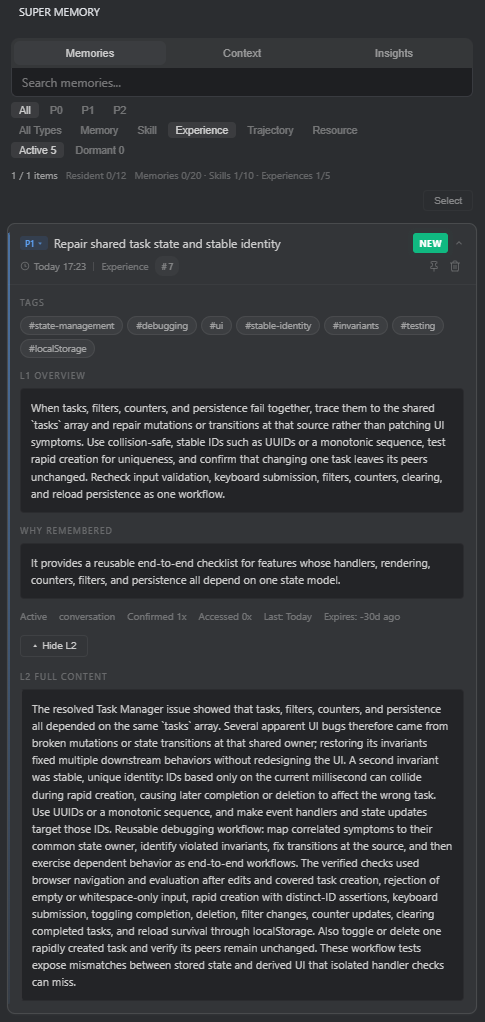
Its overview explains that when tasks, filters, counters, and persistence fail together, the investigation should begin at their shared tasks array and state transitions. It also records the need for collision-safe stable identifiers and an end-to-end workflow that retests input validation, keyboard submission, filters, counters, clearing, and reload persistence together.
The tags cover state management, debugging, UI, stable identity, invariants, testing, and localStorage. Why Remembered identifies the entry as a reusable checklist for features whose handlers, rendering, counters, filters, and persistence depend on one state model.
The distinction is important: the Skill records a repeatable repair method, while the Experience records the diagnostic reasoning, invariants, and verification strategy.
Trajectory: preserving the actual repair path
The P2 Trajectory entry retains how the task unfolded, not only the final lesson.
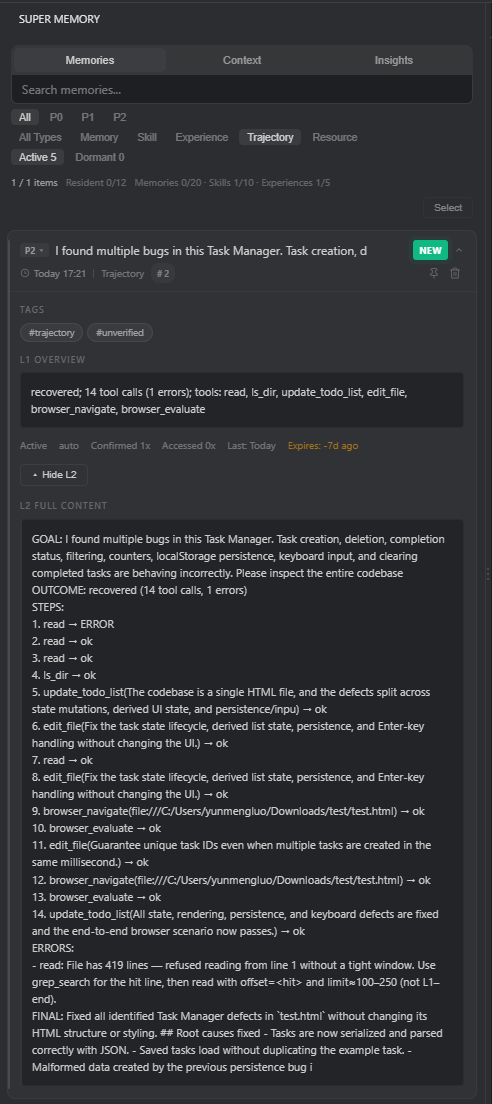
It contains the original goal, recovered outcome, tool sequence, one recoverable error, subsequent successful steps, and final result. In this example, the trajectory records 14 tool calls across code reading, directory inspection, to-do tracking, file editing, browser navigation, and browser evaluation.
The P2 and unverified labels keep this short-lived execution trace separate from the more reusable P1 Skill and Experience. It remains available when the AI needs to inspect the exact repair path, while the higher-value conclusions are stored in more durable forms.
Why this classification matters
- Memory stores durable facts, preferences, and standing information; none were created in this test.
- Skill stores a reusable method for solving the problem again.
- Experience stores the root-cause reasoning and verification checklist.
- Trajectory stores the sequence of actions, errors, and recovery.
- Resource stores the concrete files and edited locations.
This separation keeps retrieval precise and controllable. A future task can request the method, engineering lesson, execution history, or modified resource independently instead of loading one oversized generic memory.
Validation: reuse in a new conversation and a different app
A second test verifies whether the extracted knowledge remains useful beyond the original Task Manager conversation.
The old conversation is deleted, then a new conversation is created for a different HTML application: a Reading Library stored in test2.html. Its interface and data model use books instead of tasks, but it intentionally contains the same family of state, identity, filtering, counter, keyboard, deletion, and localStorage defects.
1. Start from a separate conversation
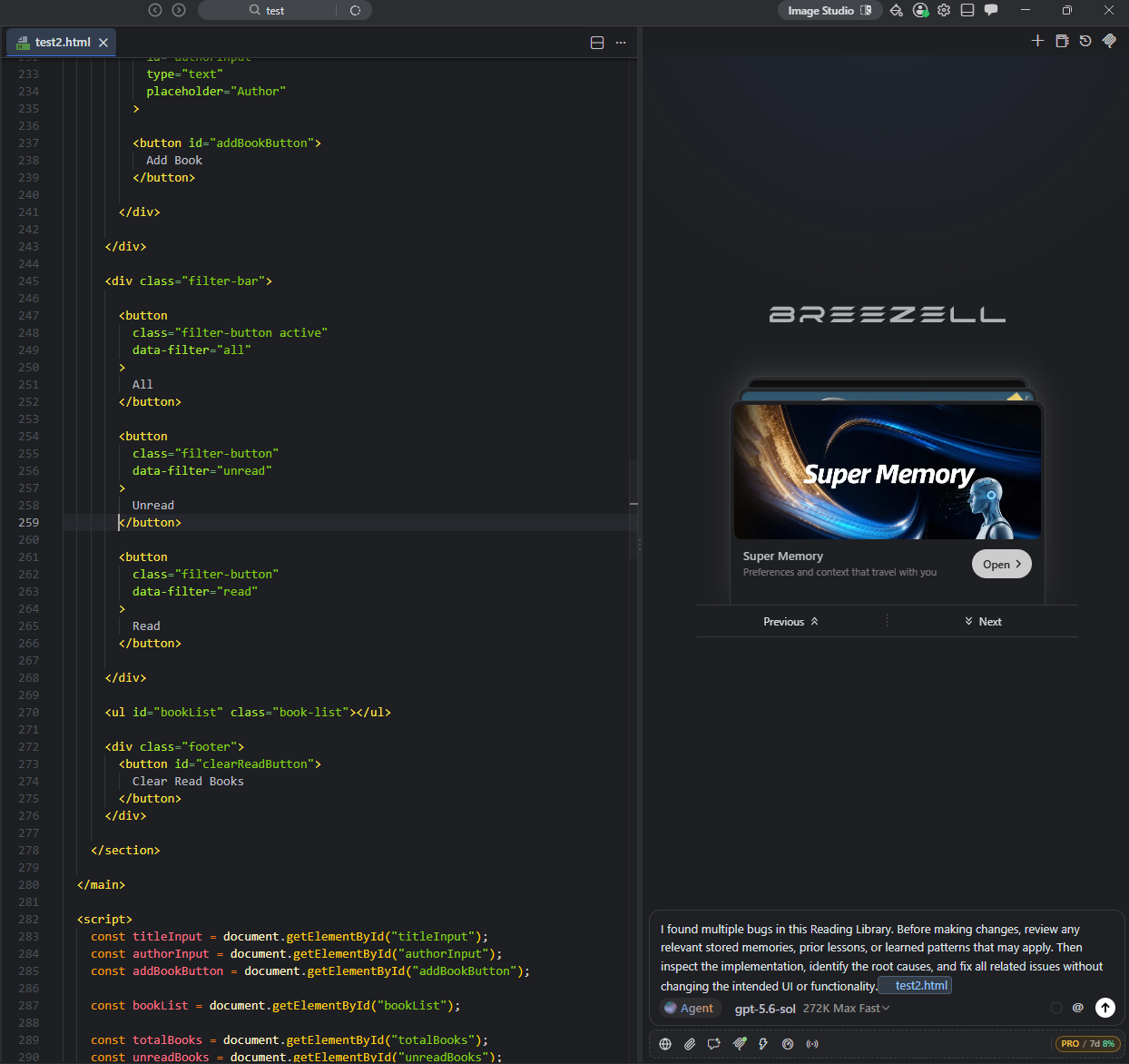
For demonstration purposes, the request explicitly asks Breezell to review relevant stored memories, prior lessons, and learned patterns before making changes. This makes recall visible during the test. Under normal use, Super Memory can automatically recall relevant knowledge without this explicit instruction.
2. Recall knowledge from the deleted conversation
Before editing test2.html, Breezell retrieves the earlier P1 Skill for guarded JSON hydration and the P2 Resource records that point to edited regions of the old test.html file.
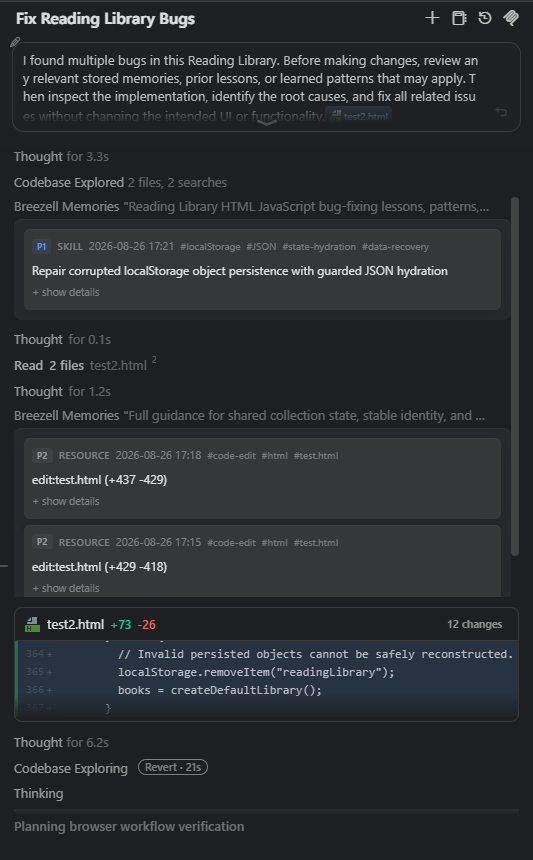
This demonstrates two different forms of recall:
- Skill recall: Supplies the reusable persistence pattern: guarded JSON.stringify and JSON.parse, safe rejection of corrupted legacy data, and restoration of a clean default.
- Resource recall: Preserves the concrete origin of the learned pattern by showing which regions of the previous file were modified.
In this test, deleting the original conversation did not remove the structured Super Memory entries extracted from it. The useful knowledge remained available to a later conversation.
3. Transfer the method instead of copying the old patch
Breezell applies the previous lesson to the Reading Library's shared books state rather than copying code written for the old tasks array.
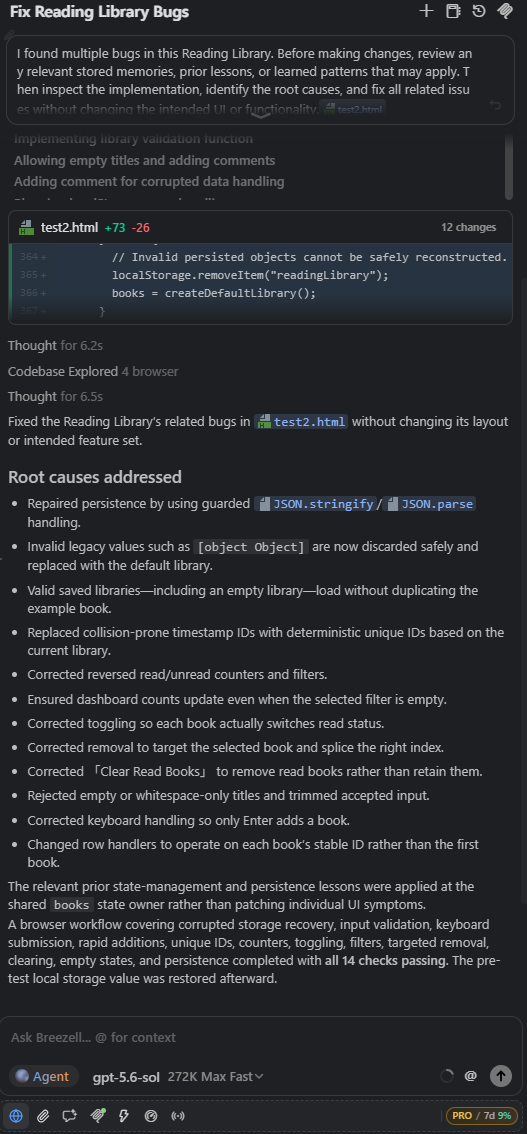
The new repair includes:
- Guarded JSON serialization and parsing.
- Safe removal of unrecoverable legacy values such as object-to-string corruption.
- Loading a valid empty library without duplicating the example book.
- Deterministic unique book identities instead of collision-prone timestamps.
- Correct read and unread counters, filters, and empty-filter states.
- Correct status toggling, targeted deletion, and clearing of read books.
- Input validation and Enter-only keyboard submission.
- Event handlers that operate on each book's stable identity.
Breezell then verifies the Reading Library through a 14-check browser workflow and restores the pre-test localStorage value afterward.
What the second test proves
- Memory survives the original chat in structured form: Deleting the previous conversation does not prevent the extracted Skill and Resource entries from being recalled in this test.
- Recall generalizes across implementations: A pattern learned from a Task Manager is applied to a different Reading Library because the underlying state and persistence failures are structurally related.
- Skills are more than patch history: The P1 Skill provides a reusable solution method, while P2 Resources preserve supporting implementation history.
- The AI repairs root causes: It transfers the shared-state, stable-identity, persistence-boundary, and end-to-end verification principles instead of reproducing old code line by line.
- Explicit recall is optional: The prompt requests memory review only to make the demonstration easy to observe. In normal conversations, relevant Super Memory entries can be recalled automatically.
Resident memories (P0)
Any Super Memory entry can be made Resident when it should be available during every memory recall, regardless of whether the current request matches it semantically.
Set an entry as resident
Hover over or select the pin icon on a memory card. The Set resident tooltip identifies the action.
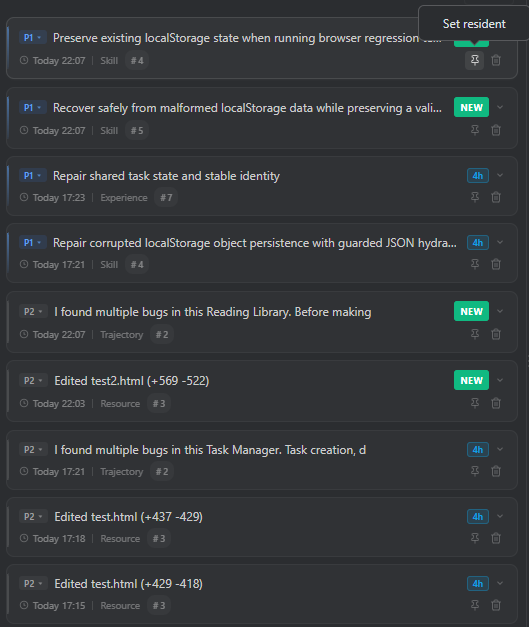
After the action:
- The entry is promoted to P0.
- A Resident badge appears on the card.
- The pin is highlighted to show that the entry is always resident.
- The resident-capacity counter increases. In the example it changes to Resident 1/12.
- The entry appears when filtering by P0.
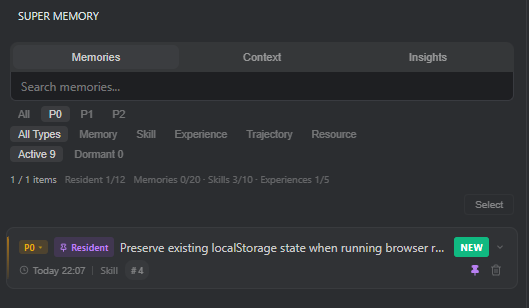
P0 is the permanent priority tier. Unlike P1 and P2 items with time-based lifecycles, a resident entry remains available until the user removes its resident status.
Resident injection in a new conversation
When Super Memory runs retrieval, resident entries are injected independently of semantic relevance.
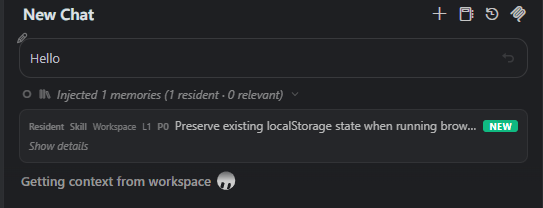
In the example, a new chat contains only “Hello,” but the status still reports:
Injected 1 memories (1 resident · 0 relevant)
This means one P0 resident entry was injected even though no additional relevance-matched memory was found. Resident memory therefore provides a reliable way to keep critical knowledge available in every recall cycle.
When to use P0
Use Resident status for information that should consistently guide the AI, such as critical architecture invariants, mandatory workflows, durable recovery rules, or essential preferences.
Avoid making temporary file locations, one-time task details, or large low-value records resident. Resident entries are injected into request context and can influence every response, so they should remain concise and genuinely universal. The interface currently shows capacity for up to 12 resident entries.
Select the highlighted pin again to remove Resident status when an entry no longer needs to be recalled every time.